Vendor Expenses Are Now Available in ARK TMS
ARK TMS Vendor Expenses help freight brokerages record paid third-party load costs, payment details, customer rebills, margin, and reporting in one workflow.
The small costs around a load have a habit of escaping the TMS. A lumper receipt lands in someone’s inbox. A toll is noted in a spreadsheet. A customs broker charge sits in a card statement. By the time the load is reviewed, the margin in the system no longer reflects what the brokerage actually spent.
Vendor Expenses are now available in ARK TMS, giving brokers one place to record already-paid third-party costs on the load, capture how they were paid, and keep those expenses reflected in margin and reporting.
Keep Load-Related Expenses With the Load
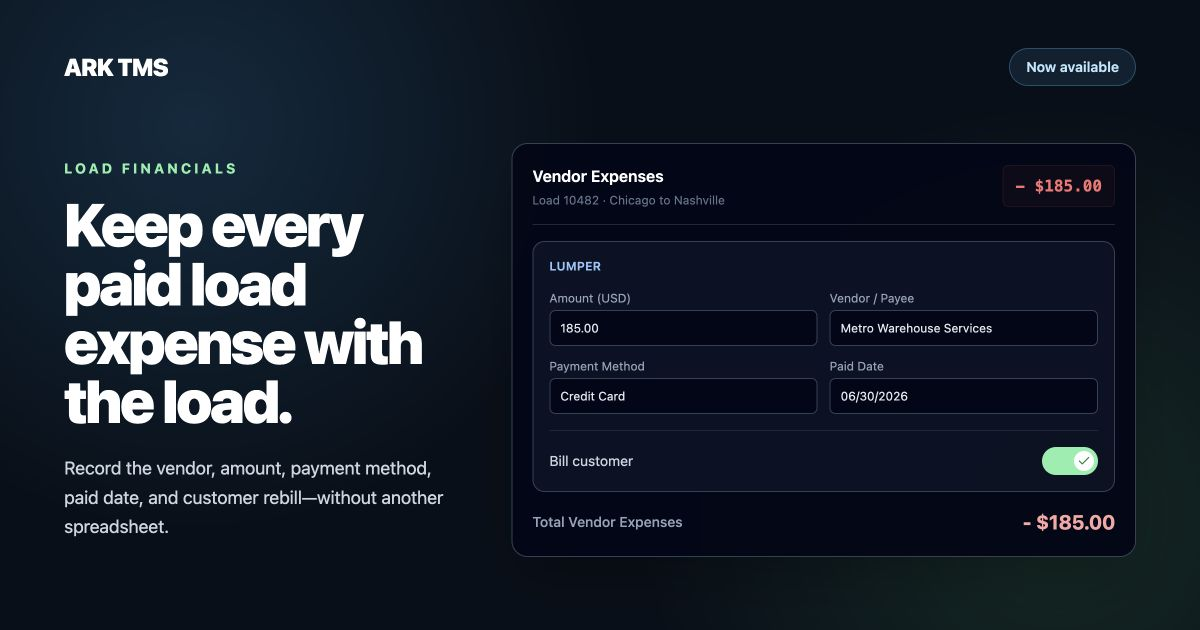
Users can add a Vendor Expense from the Dispatch financial workflow and record the expense type, amount, vendor or payee, payment method, paid date, reference number, and optional notes. Supported expense types include lumpers, customs and duties, customs brokers, transload or crossdock services, tolls, permits, storage, scale tickets, washouts, insurance, and other load-related costs.
Vendor Expenses
1 itemPayment methods include credit card, check, ACH, cash, EFS or Comcheck, wire, e-transfer, and other. That creates a clear operational record of who was paid, when the payment happened, and how the expense was handled—without sending the team to a separate spreadsheet or accounting note just to understand the load.
See the Cost in Margin and Reports
Vendor Expenses reduce Total Margin and commissionable margin, so the financial view follows the economics of the load more closely. They also appear in expense and load reporting as Vendor Expenses, separate from carrier-payable charges.
That separation matters. A paid third-party expense can belong to the load without increasing Carrier Due, entering a carrier settlement, or appearing in carrier payment runs. Operations gets a complete cost record while the carrier-pay workflow stays clean.
Rebill the Customer When the Cost Is Pass-Through
If the expense should be passed through, turn on Bill customer while recording it. ARK creates a linked Customer Pay charge using the selected expense type and amount. The rebill follows the existing customer billing path, keeping the expense and customer charge connected without asking the user to enter the same cost twice.
When an expense is fully rebilled at cost, it is margin-neutral. If the customer charge includes a markup, only that markup increases margin. Teams can review the linked charge before invoicing from the same load workflow.
How It Works
- Open the load and go to its Dispatch financials.
- Select Add Vendor Expense.
- Choose the expense type and enter the amount, Vendor / Payee, Payment Method, Paid Date, and any supporting reference or notes.
- Turn on Bill customer when the cost should become a linked customer charge.
- Review Total Vendor Expenses and Total Margin on the load, with the expense carried into reporting.
Built for Paid Vendor Costs
This release is designed for expenses the brokerage has already paid. It does not create unpaid vendor bills, vendor payment tasks, carrier settlements, Accounts Payable items, or QuickBooks vendor bills. Those workflows remain separate from Vendor Expenses.
The distinction keeps the feature useful and safe: record the real cost on the load, preserve the payment details, update margin, and optionally rebill the customer—without turning a non-carrier cost into carrier pay.
Available Now in ARK TMS
Vendor Expenses are available now and enabled by default for ARK TMS organizations. Brokerage administrators can manage the feature from Organization Settings with Enable Vendor Expenses.
Talk to ARK to see how Vendor Expenses can bring load-related operating costs, margin, and customer rebills into one workflow.