Mobile Interface Enhancements Are Now Available in ARK TMS
ARK TMS mobile interface enhancements make it easier for freight brokers to review load work, reporting, Dispatch, BOL, and connected load-board context from a phone-sized web experience.
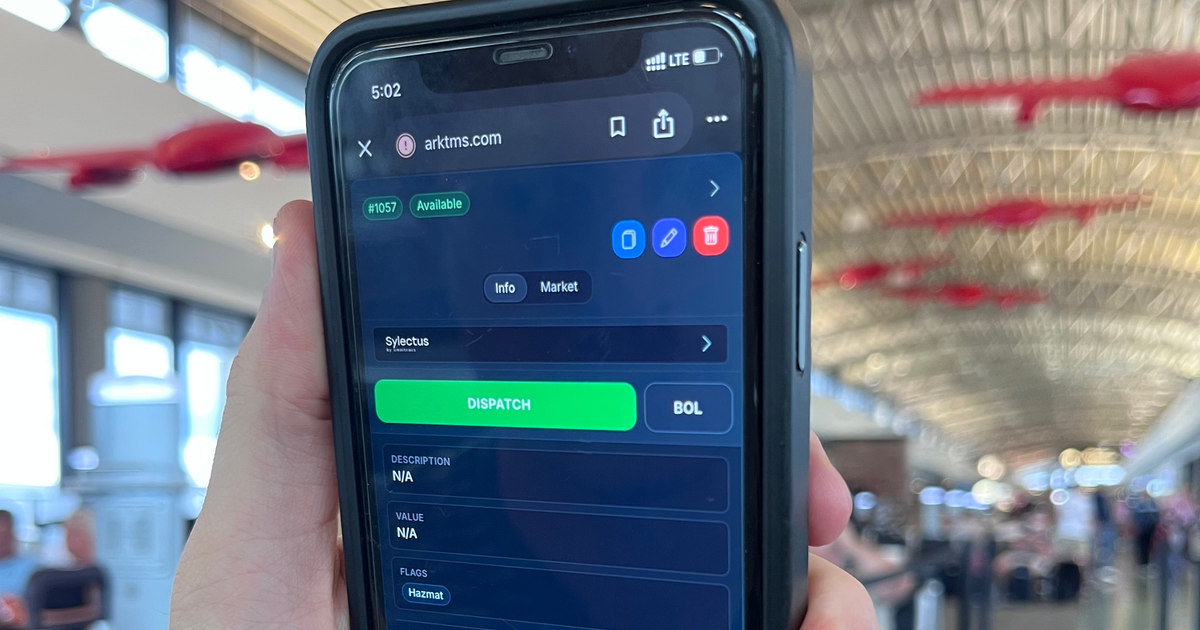
Freight brokerage work does not always wait for a desk setup. A customer calls while someone is between meetings. A carrier update lands while a dispatcher is away from the office. A manager wants a quick read on revenue, expenses, margin, or commission without opening a laptop.
ARK TMS now has a cleaner mobile web experience for the dashboard, load board, load details, and reporting surfaces brokers use most often. The goal is simple: keep the same operating system close when the work moves with you.
What Brokers Can Do From A Phone
The recent mobile interface enhancements make it easier to move through core ARK TMS workflows on a smaller screen:
- Open dashboard navigation from a compact mobile menu.
- Search loads, customers, carriers, and MC numbers from the load board.
- Review available, pending, and dispatched loads in a card-first layout.
- Open a full-screen load detail view with the same load context operators expect on desktop.
- Reach key load actions such as Dispatch and BOL from the load detail experience.
- Review report context such as revenue, expenses, margin, load count, and commission from mobile-sized report views.
This is not a separate workspace or a watered-down mobile-only view. It is the ARK TMS web app adapting better to the moments when a broker, dispatcher, or manager needs to check the operation from a phone.
Load Work That Fits The Screen
Load board work is naturally dense. The mobile view keeps the list focused on cards, then opens the selected load into a full-screen detail panel so operators are not trying to pinch around a desktop layout.
Inside load details, the mobile view keeps the important next actions close: Info, Market context for available loads, Dispatch, BOL, edit, clone, and delete where permissions allow. For available loads, connected load-board actions stay visible in context so posting status and next steps are tied to the load instead of a separate checklist.
Reporting When The Question Comes Up
Brokerage leaders often need quick answers before the formal review: How much revenue is in this view? What are expenses and margin? How many loads are represented? What does commission look like?
The mobile reporting experience is designed for that kind of check-in. Teams can review report totals and drill into supporting sections from a phone-sized layout, which helps keep operating conversations grounded in the same ARK data the team uses at the desk.
How It Works
- Open ARK TMS from a phone browser.
- Use the mobile dashboard menu to jump to Loads, Reports, Billing, or another permitted workspace.
- Search, filter, or switch load status tabs from the load board.
- Tap a load to open the mobile detail view.
- Use the visible action controls to review context, start Dispatch, generate a BOL, or continue connected load-board work when enabled.
Permissions, organization settings, and enabled integrations still determine which actions each user can see and use.
Why It Matters
Small brokerage teams run on fast handoffs. The person who has the answer is not always sitting in front of the biggest monitor. Cleaner mobile access helps reduce the small delays that come from waiting to get back to a laptop, asking someone else to check a screen, or trying to interpret a desktop layout from a phone.
The result is a more flexible operating rhythm: quick checks from the road, cleaner load context during customer calls, and easier access to the same reporting numbers the team uses for weekly reviews.
Availability
The mobile interface enhancements are available in ARK TMS as part of the web application experience. Access to specific pages and actions depends on each user's permissions, organization settings, and enabled integrations.
Talk to ARK if your brokerage wants to see how ARK TMS supports load execution, reporting, billing, and connected load-board workflows from one workspace.